Free Mac plugin · iPhone app

Your mix,
on the speaker
people actually use.

For music and film. MixOutpost streams the mix from your DAW or video editor to your iPhone: lossless, bit-exact and encrypted, while you're still working. Check it on the phone speaker, your AirPods or any AirPlay or Bluetooth speaker, switch to mono, and read loudness against Spotify or Netflix without bouncing a thing.

AU · VST3 · Mac audio app  /  Logic, Ableton, Resolve, Premiere and more  /  macOS 12+ · iOS 17+

48 kHzlossless, bit-exact
TLS 1.3paired phones only
8phones listening at once
0subscriptions

Why

Most people will hear your track or your film on a phone. Check it there before you deliver.

Songs get played on phone speakers and earbuds. Films and shows get watched on phones and laptops. Bouncing a reference, AirDropping it and pressing play has always been part of the job, and it's slow. It also tells you nothing about the change you made thirty seconds ago. MixOutpost puts the live session on your phone, whether it's a song in your DAW or a timeline in your editor, so the phone becomes another monitor you can reach for.

How it works

Three steps. Nothing to set up again next session.

  1. 01

    Insert on the main output

    Put the MixOutpost plugin last on your master bus, whether that's the Stereo Out in your DAW or the main bus in your editor, and press Start Sharing. It never touches your audio, and offline bounces and exports are skipped.

    No master bus, like Final Cut Pro? The Mac app shares all Mac audio through a system tap, with no loopback driver and no feedback.

  2. 02

    Pair your iPhone once

    Scan the QR code with the app or the iPhone Camera, or enter a 6-digit code and approve it on the Mac. One pairing covers every plugin instance on that Mac.

  3. 03

    Tap Listen

    Your session plays on the phone with the screen locked or in other apps: on its speaker, AirPods, or any AirPlay, Bluetooth or wired device the phone can reach.

Full setup walkthroughSetup for your DAW or editor

The iPhone app

What you see on the phone.

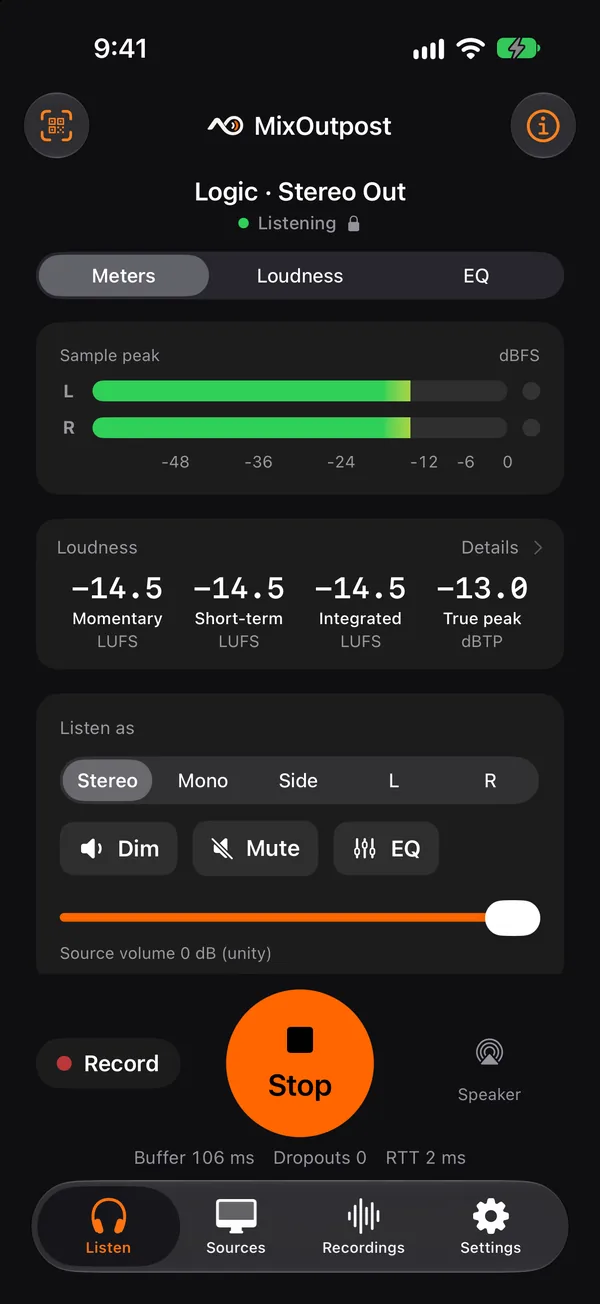
MixOutpost on iPhone listening to Logic's Stereo Out: peak meters, loudness, and Listen as Stereo, Mono, Side, L or R
ListenMeters, loudness and Listen as Mono or Side, while your session plays.
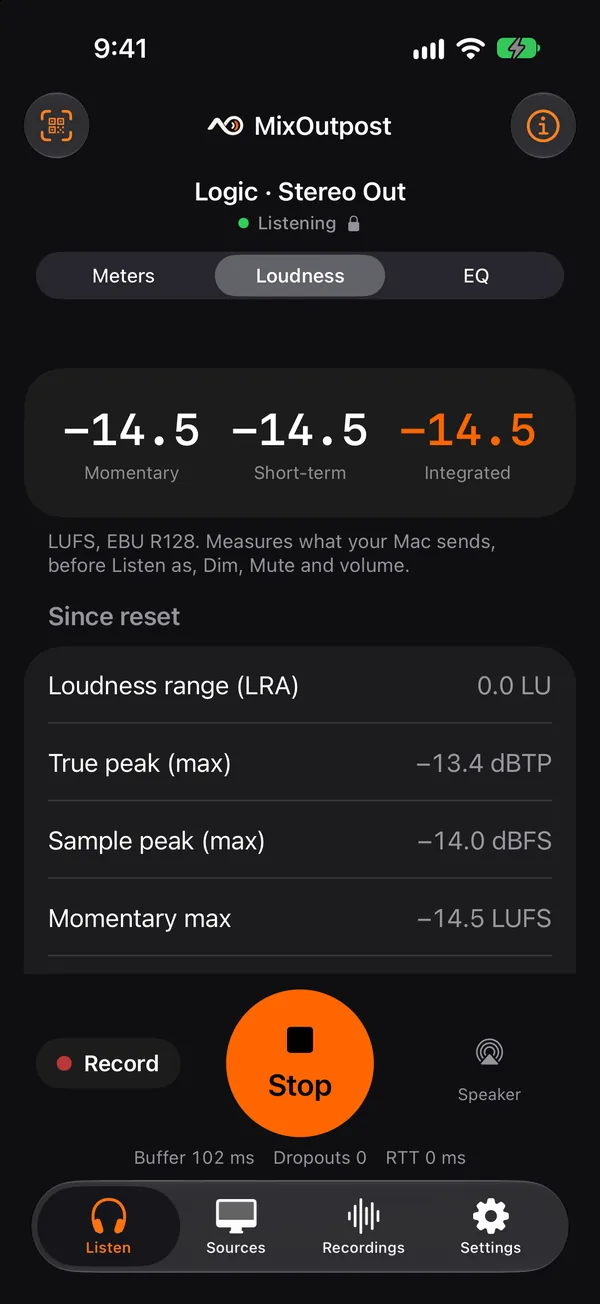
The Loudness page: momentary, short-term and integrated LUFS, loudness range and true peak
LoudnessLUFS, LRA and true peak against streaming, broadcast and Netflix targets.
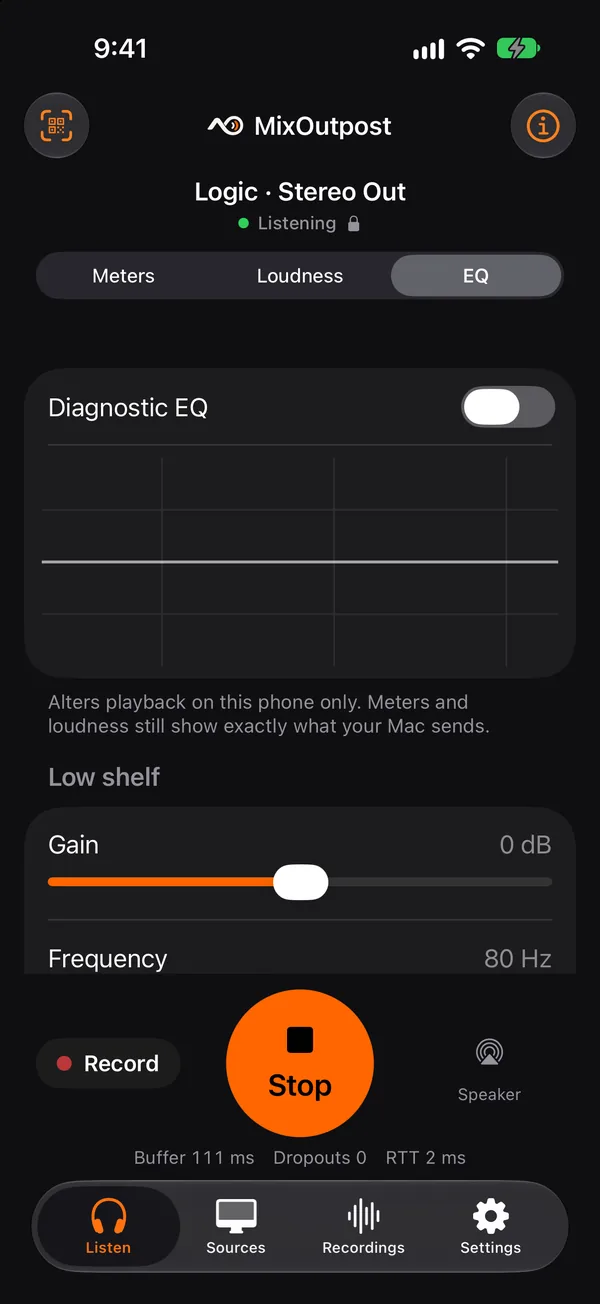
The diagnostic EQ page with a low shelf and peak bands
Diagnostic EQMimic other small speakers on the phone. Your meters stay untouched.
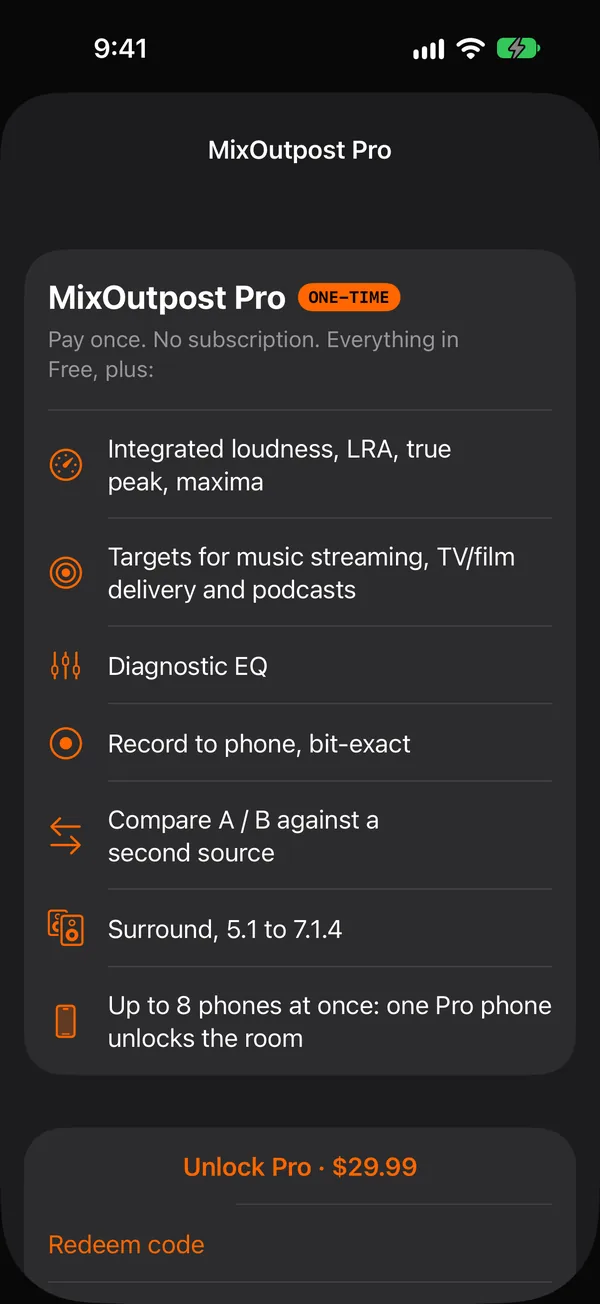
The MixOutpost Pro screen: a one-time purchase that adds full loudness, EQ, recording, Compare, surround and more phones
Pro, onceOne purchase unlocks the full toolset. No subscription.

Not just the phone

Your mix on any speaker your iPhone can play to.

The iPhone is the hub. Whatever it can send audio to, your live session can play on: AirPlay, Bluetooth or a cable. Walk the mix from the studio to the living room without exporting a thing.

AirPlay
HomePod, Apple TV and the TV it's plugged into, AirPlay smart speakers, receivers and soundbars.
Bluetooth
Portable and smart speakers, consumer headphones and earbuds, and a car stereo within reach of your Wi-Fi.
AirPods and headphones
Every AirPods model, Beats and other headphones. Surround plays spatialized on AirPods and AirPlay.
Wired
Lightning or USB-C headphones and audio interfaces, with no wireless codec or added delay in the way.

AirPlay and Bluetooth add their own delay, typically a fraction of a second to about two seconds, so what you hear runs a little behind the Mac. For checking how a mix translates, that doesn't matter.

Checking the mix

The checks you'd do in the car or on the couch, now in the chair.

Listen as Stereo, Mono, Side, L or R

Find out what survives the mono speaker: the vocal, the dialogue, the kick. Hear what's living in the sides. It's one tap on the phone, and your session stays untouched.

Mono compatibility guide

Full stereo image, as your Mac sends it.

Loudness against the delivery you're mixing for

Momentary, short-term and integrated LUFS (EBU R128), LRA and true peak, against music streaming, broadcast and Netflix delivery specs. See how a service will treat your track, or whether your program passes.

All loudness targets

    Peak meters

    With clip indicators, and per channel for surround.

    Diagnostic EQ

    Low shelf, mid peak and high shelf let you mimic small speakers. The meters ignore it.

    Record to phone

    Bit-exact 32-bit float WAV of exactly what arrived, saved in Files.

    Compare A / B

    Add a second source as B, like a reference or last night's version. Match their volumes and switch without clicks.

    Dim, Mute & volume

    −20 dB dim, a mute, and volume that snaps to unity and is remembered for each source.

    Surround

    5.1 up to 7.1.4 from plugin buses. Spatial on AirPods and AirPlay, folded down on the speaker.

    Built not to break the session

    Nothing matters more than your session not crashing.

    Reliability is never a paid feature. It's the whole point.

    • Transparent insert. The plugin never changes your audio. The output is bit-identical to the input.
    • Bit-exact at 48 kHz. 44.1, 88.2 and 96 kHz sessions are converted cleanly to 48 kHz.
    • Auto-reconnect after Wi-Fi drops, mesh roaming, or when you stop and restart sharing.
    • Adaptive buffer fits your Wi-Fi, with Standard and Stable options. For the steadiest playback, use a USB-C Ethernet adapter.
    • Works when discovery is blocked. Connect by address, and paired sources are remembered.
    • Connection info shows format, bit-exact status, buffer, round trip, dropouts, network and security at a glance.
    • Paired and encrypted. Only phones you approve can listen, and all audio travels over TLS 1.3.

    Everyone in the room

    The artist hears it on their phone. So do the director and the client.

    Up to eight phones can listen at once. Each phone has its own volume, Listen as mode and output, and the plugin shows you who's connected.

    What's different

    Built around the check you do every day, not a monthly bill.

    Mono and Side are free

    Mono is the most important check on a phone speaker, so it isn't behind a paywall.

    Encrypted on your own network

    Every stream uses TLS 1.3 and paired devices, even inside your studio. Not just on a paid relay.

    Bit-exact, and it proves it

    Connection info on the phone tells you whether what you hear matches what left the Mac, sample for sample.

    Buy Pro once

    No monthly fee for a tool you open every session, and no account to create.

    Free & Pro

    Free does the job. Pro is a one-time purchase. No subscription.

    The Mac plugin and app are free, with no license keys, serials or accounts. Pro will be a single in-app purchase on iPhone.

    Free

    $0

    • Mac plugin (AU, VST3) and Mac audio app
    • Lossless, bit-exact streaming
    • Pairing and encryption
    • Auto-reconnect, buffering, locked-screen playback
    • Peak meters and connection info
    • Listen as Mono, Side, L, R
    • Dim, Mute, source volume
    • Momentary and short-term LUFS

    Pro One-time

    $29.99 once

    • Everything in Free, plus:
    • Integrated loudness, LRA, true peak, maxima
    • Targets for streaming, TV/film and podcasts
    • Diagnostic EQ
    • Record to phone
    • Compare A / B
    • Surround, 5.1 to 7.1.4
    • More phones listening at once

    The Free and Pro split may change before launch. Pricing details

    Requirements

    Mac
    macOS 12 or later (sharing all Mac audio from the app needs macOS 14.2+). Universal: Apple Silicon and Intel. Signed and notarized.
    Formats
    Audio Unit and VST3. Verified in Logic Pro and Ableton Live. Expected to work in DaVinci Resolve and Premiere Pro; Final Cut Pro via the Mac app. Pro Tools and Media Composer (AAX) are on the way. Compatibility
    iPhone
    iOS 17 or later, on the same network as the Mac. A USB-C Ethernet adapter also works.
    Audio
    48 kHz stereo, bit-exact. Surround up to 7.1.4.

    FAQ

    Questions

    Does it work over the internet?

    Not yet. MixOutpost streams over your local network (Wi-Fi or Ethernet). Remote listening over the internet is planned but on hold.

    Will it change what my DAW or editor outputs?

    No. The plugin is a transparent insert, and its output is bit-identical to its input. It just sends a copy to the paired phones. Offline bounces and exports are skipped, so they don't flood the phone.

    Is it really lossless?

    Yes. At 48 kHz, the audio arrives bit-exact, and Connection info on the phone confirms it. Sessions at other rates are converted to 48 kHz. Record on the phone and you get a 32-bit float WAV of exactly what arrived.

    Can someone else on the network listen in?

    No. Only phones you've paired can connect, and all audio is encrypted with TLS 1.3. Pairing takes a QR code, or a 6-digit code that you approve on the Mac.

    Which DAWs and video editors are supported?

    Any Mac host that loads AU or VST3 plugins. It's verified in Logic Pro, including when Logic runs plugins in a separate process, and in Ableton Live as both AU and VST3. Video editors with a mixer, like DaVinci Resolve and Premiere Pro, take the same plugin on the main bus (not yet tested). Pro Tools (AAX) is coming. For anything else, including Final Cut Pro, the Mac app can share all Mac audio.

    Android, Windows or iPad?

    A Windows sender, an Android listener and an Apple TV app are planned after launch. An iPad layout has been proposed.

    Why not a subscription?

    Because you'd use this every session, for years. Pro will be a single purchase, and the Mac side is free.

    All questionsStreaming vs bouncing

    Built by film and music makers

    Built by people who make films and music.

    MixOutpost was created by director, editor and producer Wayan Palmieri, together with recording artist and music producer Ido Liran (Quadra / Save the Robot). We built it to fix a problem in our own workflow: hearing the live mix on the devices people actually use, without exporting and transferring a new file every time.

    Wayan Palmieri

    Wayan Palmieri

    Filmmaker | Creative Technologist | Producer | AI & Hybrid Production

    Director, editor and producer. His recent work includes AI production for Season 14 of Fox's The Masked Singer.

    Ido Liran

    Ido Liran

    DJ and Music Artist

    Producing electronic music since the mid-1990s as Quadra and Save the Robot, with tracks on more than 100 releases.

    MixOutpost app icon

    Get started

    Install the free Mac plugin now. The iPhone app is free on the App Store.

    Mac plugin and app · Universal · Signed and notarized